Install FTL: Hyperspace on SteamOS manually
-
Switch to desktop mode
Section titled “Switch to desktop mode”Press the Steam button, then Power, then Switch to Desktop.
-
Steam settings
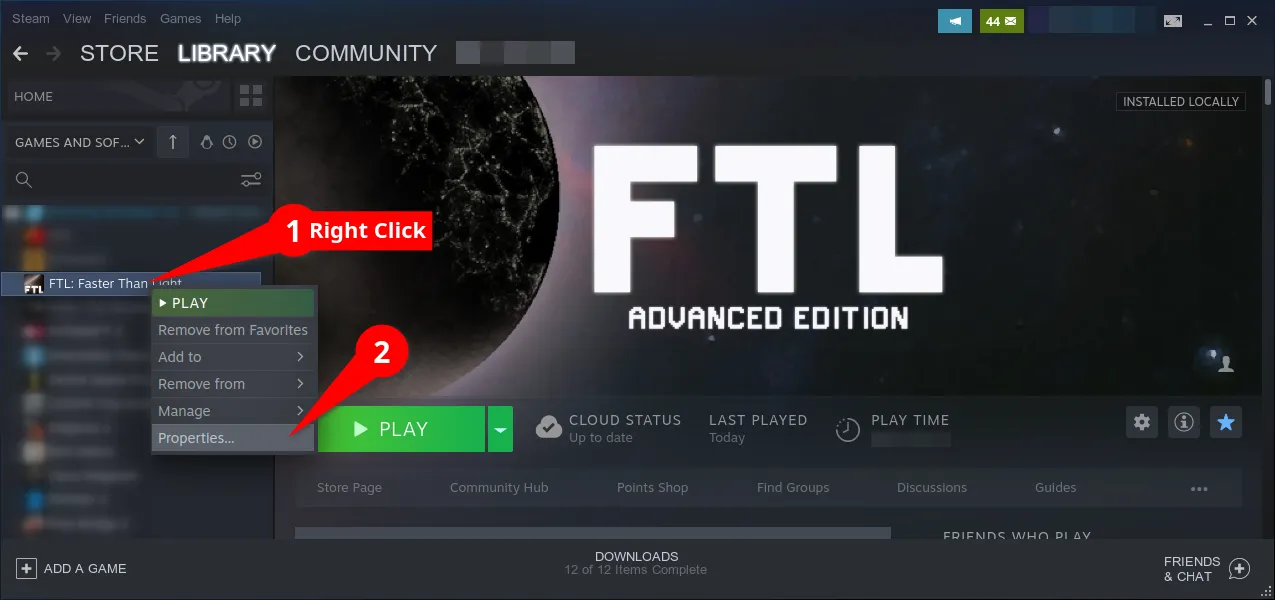
Section titled “Steam settings”Right-click FTL: Faster Than Light in your library and open Properties.
Show me how to open Properties
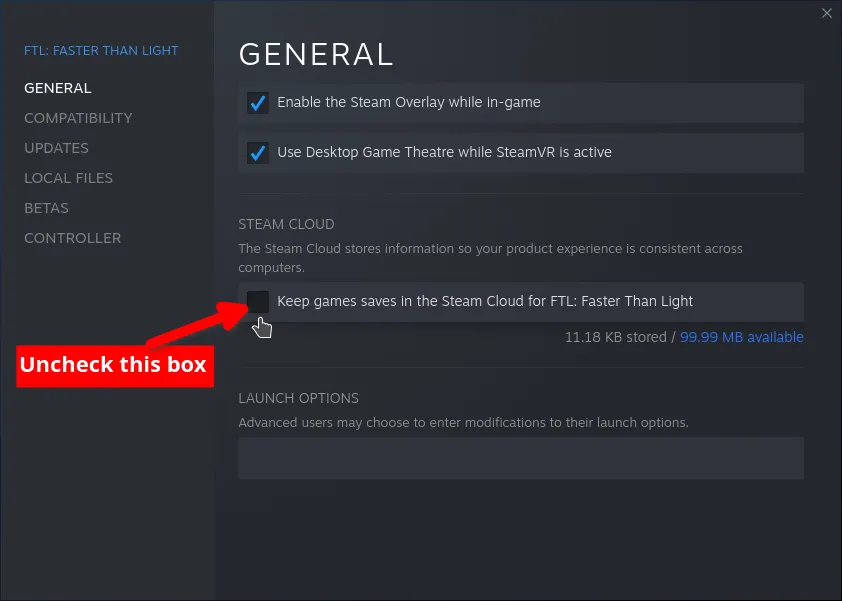
Under General, untick Keep game saves in the Steam Cloud. Turn off Steam Cloud first. It restores outdated saves with broken state, which can keep Hyperspace from launching and will undo any save fix you try later.
Show me the checkbox
Then under Updates, set automatic updates to Only update this game when I launch it.
Your saves live in
~/.local/share/FasterThanLight.Rename
FasterThanLighttoFasterThanLight-backup, then launch FTL. The game makes a fresh folder, and your original saves stay in the backup if you ever want them back.Do this once, right after turning Steam Cloud off. Cloud sync leaves behind a save that Hyperspace cannot read, which freezes the game at the end of the loading bar.
-
Install the Hyperspace library
Section titled “Install the Hyperspace library”Download
FTL.Hyperspace.x.xx.x-Linux.zipfrom the latest release and extract it. Inside you will find:- Hyperspace.ftl keep this for the mod manager step
- README.txt
DirectoryLinux/
- Hyperspace.1.6.12.amd64.so
- Hyperspace.1.6.13.amd64.so
Which library you need depends on your FTL version. Launch FTL and read the version from the lower right of the main menu rather than guessing, then close the game.
Your FTL version Vendor Library to copy 1.6.13 Steam Hyperspace.1.6.13.amd64.so1.6.12 GOG, Humble, DRM-free Hyperspace.1.6.12.amd64.so- Copy one Hyperspace library, the one matching your version, into the folder
containing
FTL.amd64. - Open the
FTLlaunch script in a text editor and add a line beforeexec:
Terminal window LD_PRELOAD=./Hyperspace.1.6.13.amd64.so exec "$here/$command.$arch" "$@" -
Set up a mod manager
Section titled “Set up a mod manager”Ftlman is the recommended mod manager for FTL: Hyperspace modding. Actively maintained and supports Hyperspace updates
If FTL is currently modded (
ftl.datis bigger than ~270 MB), revert it to vanilla first, either with your mod manager or by reinstalling the game.- Download the build for your machine from the ftlman releases page.
- Extract the
ftlmanfolder anywhere you like. It does not have to live in your FTL directory. - Run
ftlman. A Steam install is detected automatically. If yours sits somewhere non-standard, or you have more than one copy and want a specific one, open Settings and set FTL data directory yourself: the folder holdingftl.datinside the game installation.
-
Patch Hyperspace in
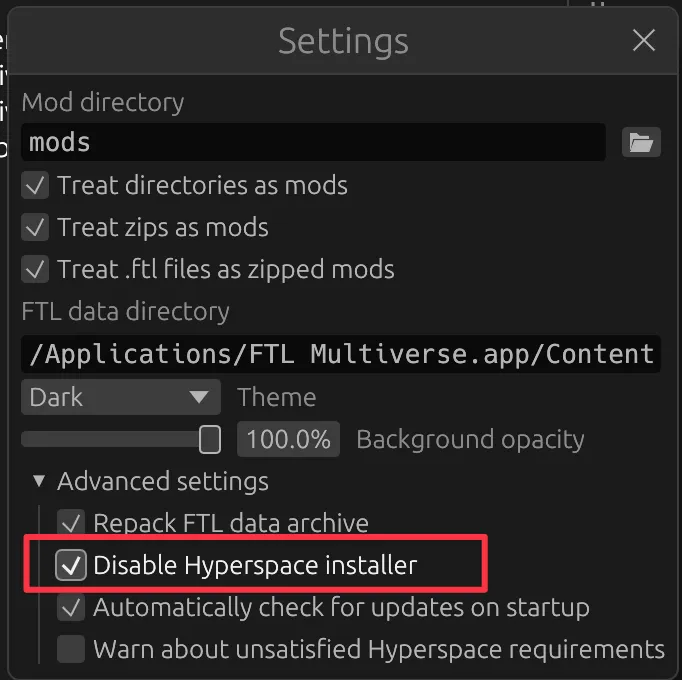
Section titled “Patch Hyperspace in”Turn off ftlman’s own Hyperspace installer, which would otherwise overwrite the files you installed by hand: in Settings, open Advanced settings and tick Disable Hyperspace installer.
Show me the setting
Put
Hyperspace.ftlfrom the ZIP into the ftlman’smodsfolder.- Put your mods in the ftlman’s
modsfolder. - Press Scan in the top right so ftlman can find them.
- Drag `Hyperspace.ftl` to the top of the list. Check the order, top to bottom:
- `Hyperspace.ftl`
- Your other mods
Tick mods you want to use. Order matters, some mods specify that they must be loaded before (e.g. Multiverse Assets). To change order simply drag the mod up or down in the list.
- Press Apply.
-
Check it worked
Section titled “Check it worked”Launch FTL. About halfway through the loading screen, and again on the menu, a small version string appears in the top right. That is Hyperspace reporting itself, and it means the binary is loaded.
Hyperspace is now installed. Return to gaming mode and launch FTL as usual.
Adding Multiverse
Section titled “Adding Multiverse”Multiverse is the largest mod built on Hyperspace, and it installs differently from everything else.
-
Open the Multiverse Official Downloads board and pick the newest [FTL MULTIVERSE BASE MOD] thread.
-
In the first post, scroll to Manual install and download both the DATA and ASSETS files. Ignore the installer above them, that one is Windows-only and does its own thing.
Alternative way to download is to use Multiverse release thread under DOWNLOAD RAW FILES.
-
Put both
.zipfiles in your mod manager’smodsfolder.
- Press Scan in the top right so the new files show up
- If ftlman installed Hyperspace for you (you have not disabled the installer
in Settings → Advanced settings), skip this step.
If you installed Hyperspace manually, drag
Hyperspace.ftlto the top of the list. It must be above all other mods. - Drag
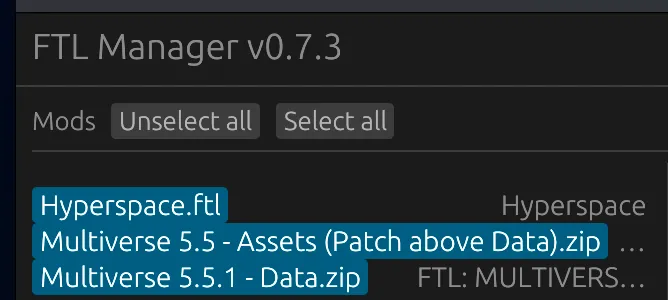
Multiverse Assets.zipaboveMultiverse Data.zip - Check the order, top to bottom:
Hyperspace.ftl(optional)Multiverse Assets.zipMultiverse Data.zip
- Select the mods: click each entry until it is highlighted blue
- Press Apply
Show me what it should look like